
Permission Tester
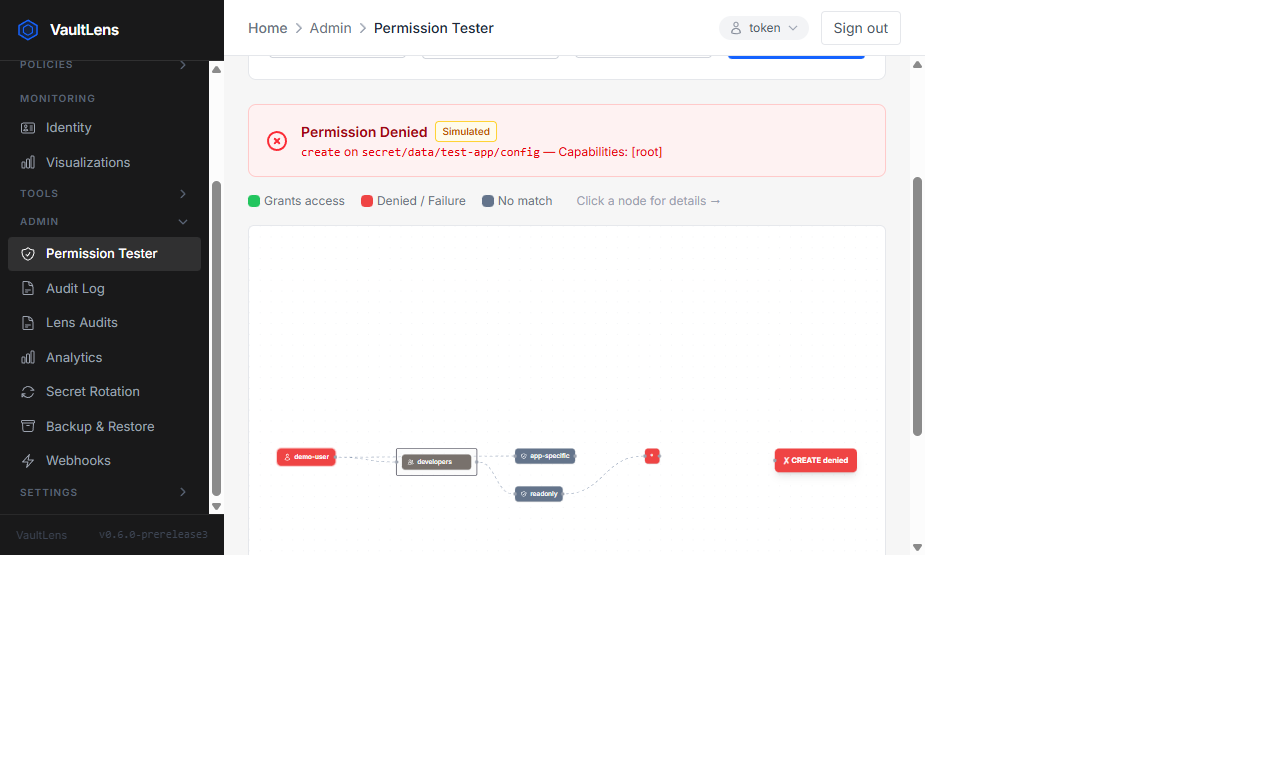
The Permission Tester lets you simulate what a specific Vault entity can do on any path — without actually performing the operation.
How It Works
- Navigate to Admin → Permission Tester
- Select an entity from the dropdown
- Enter a Vault path (e.g.
secret/data/myapp/config) - Select an operation (
create,read,update,delete,list,sudo) - Click Test — the result shows Allowed or Denied
The result graph visualizes the full policy evaluation chain:
Entity → Groups → Policies → Path Rules → ResultHow Permissions Are Evaluated
VaultLens evaluates permissions by parsing the entity's attached policies (via group memberships) using the same logic as Vault's ACL engine. The evaluation works from the entity's policies, not from /sys/capabilities-self — so it correctly simulates another user's access, not the logged-in user's.
Key rules:
- Explicit deny always wins over any allow
- Policies are unioned — if any policy allows an operation, it's allowed
- Wildcard paths (
secret/data/*) match any sub-path sudocapability is required for protected endpoints even ifreadis granted
Use Cases
- Access reviews — verify an entity has exactly the permissions you expect
- Debugging — find out why a user can or can't access a path
- Policy testing — test policy changes before assigning them to real users
- Audit preparation — document permission decisions with visual evidence
Important
The Permission Tester evaluates policies as VaultLens parses them. Complex HCL constructs (templating, sentinel policies) may not be fully evaluated. Always verify critical access decisions in Vault directly.